bpftrace in Action
- bpftrace
- bpftrace Probe types
- Example One-Liners
- uprobe (用户态函数探针)
- bpftrace Reference Guide
- Examples
- Refer
bpftrace
High-level tracing language for Linux eBPF.
bpftrace is a high-level tracing language for Linux enhanced Berkeley Packet Filter (eBPF) available in recent Linux kernels (4.x).
bpftrace uses LLVM as a backend to compile scripts to BPF-bytecode and makes use of BCC for interacting with the Linux BPF system, as well as existing Linux tracing capabilities: kernel dynamic tracing (kprobes), user-level dynamic tracing (uprobes), and tracepoints.
The bpftrace language is inspired by awk and C, and predecessor tracers such as DTrace and SystemTap.
bpftrace was created by Alastair Robertson.
To learn more about bpftrace, see the Manual the Reference Guide and One-Liner Tutorial.
$bpftrace -h
USAGE:
    bpftrace [options] filename
    bpftrace [options] - <stdin input>
    bpftrace [options] -e 'program'

OPTIONS:
    -B MODE        output buffering mode ('full', 'none')
    -f FORMAT      output format ('text', 'json')
    -o file        redirect bpftrace output to file
    -d             debug info dry run
    -dd            verbose debug info dry run
    -b             force BTF (BPF type format) processing
    -e 'program'   execute this program
    -h, --help     show this help message
    -I DIR         add the directory to the include search path
    --include FILE add an #include file before preprocessing
    -l [search]    list probes
    -p PID         enable USDT probes on PID
    -c 'CMD'       run CMD and enable USDT probes on resulting process
    --usdt-file-activation
                   activate usdt semaphores based on file path
    --unsafe       allow unsafe builtin functions
    -v             verbose messages
    --info         Print information about kernel BPF support
    -k             emit a warning when a bpf helper returns an error (except read functions)
    -kk            check all bpf helper functions
    -V, --version  bpftrace version

ENVIRONMENT:
    BPFTRACE_STRLEN             [default: 64] bytes on BPF stack per str()
    BPFTRACE_NO_CPP_DEMANGLE    [default: 0] disable C++ symbol demangling
    BPFTRACE_MAP_KEYS_MAX       [default: 4096] max keys in a map
    BPFTRACE_CAT_BYTES_MAX      [default: 10k] maximum bytes read by cat builtin
    BPFTRACE_MAX_PROBES         [default: 512] max number of probes
    BPFTRACE_LOG_SIZE           [default: 1000000] log size in bytes
    BPFTRACE_PERF_RB_PAGES      [default: 64] pages per CPU to allocate for ring buffer
    BPFTRACE_NO_USER_SYMBOLS    [default: 0] disable user symbol resolution
    BPFTRACE_CACHE_USER_SYMBOLS [default: auto] enable user symbol cache
    BPFTRACE_VMLINUX            [default: none] vmlinux path used for kernel symbol resolution
    BPFTRACE_BTF                [default: none] BTF file

EXAMPLES:
bpftrace -l '*sleep*'
    list probes containing "sleep"
bpftrace -e 'kprobe:do_nanosleep { printf("PID %d sleeping...\n", pid); }'
    trace processes calling sleep
bpftrace -e 'tracepoint:raw_syscalls:sys_enter { @[comm] = count(); }'
    count syscalls by process name
bpftrace Probe types
See the Manual for more details.
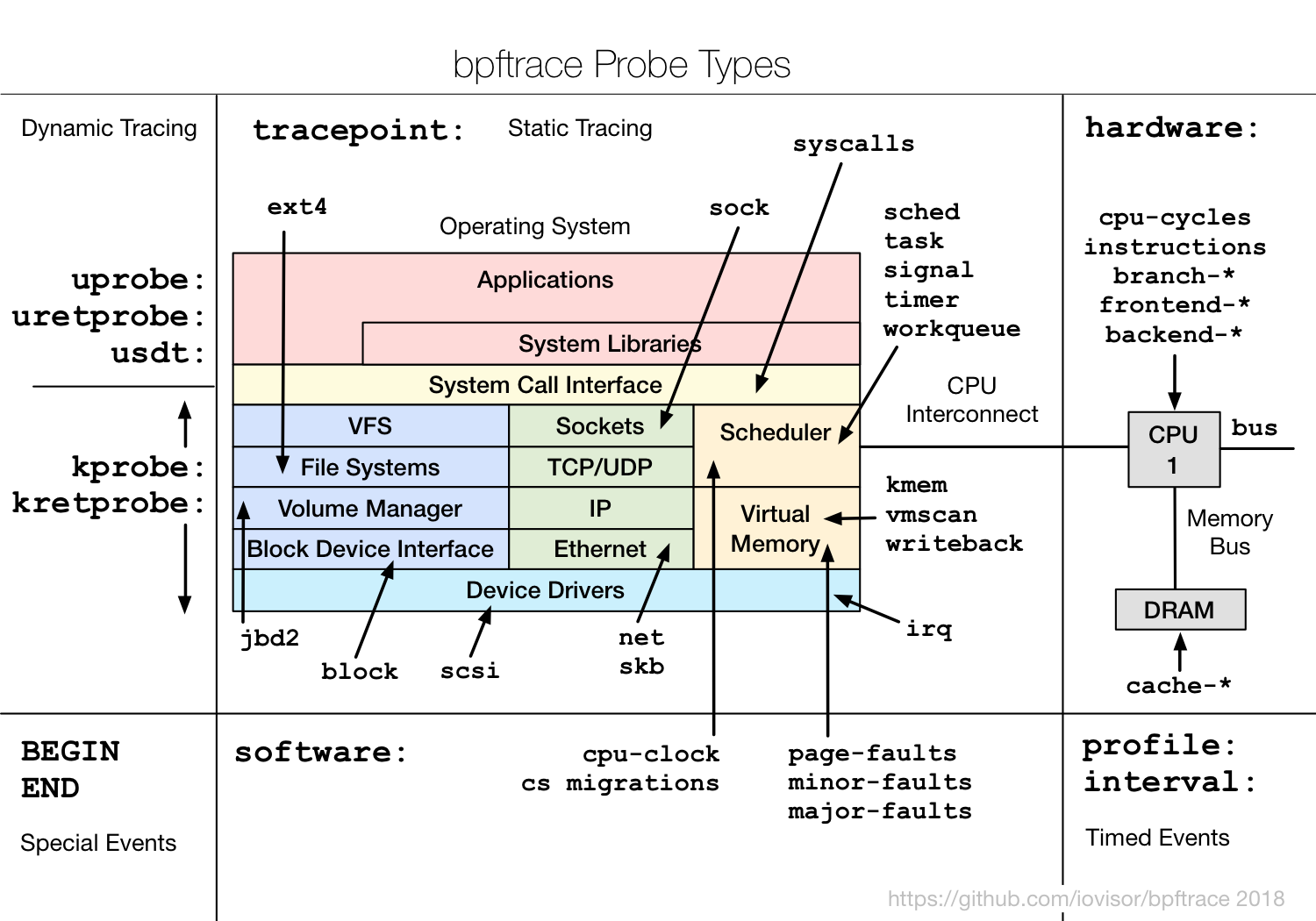
Example One-Liners
The following one-liners demonstrate different capabilities:
# Files opened by thread name
bpftrace -e 'tracepoint:syscalls:sys_enter_open { printf("%s %s\n", comm, str(args->filename)); }'

# Syscall count by thread name
bpftrace -e 'tracepoint:raw_syscalls:sys_enter { @[comm] = count(); }'

# Read bytes by thread name:
bpftrace -e 'tracepoint:syscalls:sys_exit_read /args->ret/ { @[comm] = sum(args->ret); }'

# Read size distribution by thread name:
bpftrace -e 'tracepoint:syscalls:sys_exit_read { @[comm] = hist(args->ret); }'

# Show per-second syscall rates:
bpftrace -e 'tracepoint:raw_syscalls:sys_enter { @ = count(); } interval:s:1 { print(@); clear(@); }'

# Trace disk size by PID and thread name
bpftrace -e 'tracepoint:block:block_rq_issue { printf("%d %s %d\n", pid, comm, args->bytes); }'

# Count page faults by thread name
bpftrace -e 'software:faults:1 { @[comm] = count(); }'

# Count LLC cache misses by thread name and PID (uses PMCs):
bpftrace -e 'hardware:cache-misses:1000000 { @[comm, pid] = count(); }'

# Profile user-level stacks at 99 Hertz for PID 189:
bpftrace -e 'profile:hz:99 /pid == 189/ { @[ustack] = count(); }'

# Files opened in the root cgroup-v2
bpftrace -e 'tracepoint:syscalls:sys_enter_openat /cgroup == cgroupid("/sys/fs/cgroup/unified/mycg")/ { printf("%s\n", str(args->filename)); }'
More powerful scripts can easily be constructed. See Tools for examples.
uprobe (用户态函数探针)
$uprobe -h
USAGE: uprobe [-FhHsv] [-d secs] [-p PID] [-L TID] {-l target |
              uprobe_definition [filter]}
                 -F              # force. trace despite warnings.
                 -d seconds      # trace duration, and use buffers
                 -l target       # list functions from this executable
                 -p PID          # PID to match on events
                 -L TID          # thread id to match on events
                 -v              # view format file (don't trace)
                 -H              # include column headers
                 -s              # show user stack traces
                 -h              # this usage message

Note that these examples may need modification to match your kernel
version's function names and platform's register usage.
   eg,
       # trace readline() calls in all running "bash" executables:
           uprobe p:bash:readline
       # trace readline() with explicit executable path:
           uprobe p:/bin/bash:readline
       # trace the return of readline() with return value as a string:
           uprobe 'r:bash:readline +0($retval):string'
       # trace sleep() calls in all running libc shared libraries:
           uprobe p:libc:sleep
       # trace sleep() with register %di (x86):
           uprobe 'p:libc:sleep %di'
       # trace this address (use caution: must be instruction aligned):
           uprobe p:libc:0xbf130
       # trace gettimeofday() for PID 1182 only:
           uprobe -p 1182 p:libc:gettimeofday
       # trace the return of fopen() only when it returns NULL:
           uprobe 'r:libc:fopen file=$retval' 'file == 0'

See the man page and example file for more info.
bpftrace Reference Guide
Hello World
The most basic example of a bpftrace program:
# bpftrace -e 'BEGIN { printf("Hello, World!\n"); }'
Attaching 1 probe...
Hello, World!
^C
The syntax to this program will be explained in the Language section. In this section, we’ll cover tool usage.
A program will continue running until Ctrl-C is hit, or an exit() function is called. When a program exits, all populated maps are printed: this behavior, and maps, are explained in later sections.
Examples
函数插桩
// test.cc
#include <cstdio>

int main(int argc, char **argv)
{
    printf("hello world\n");
    return 0;
}
$ g++ test.cc
$ bpftrace -v -e 'uprobe:./a.out:main {printf("test\n");}'
BTF: failed to read data (No such file or directory) from: /boot/vmlinux-5.4.32-1-tlinux4-0001
Attaching 1 probe...

Program ID: 19

Bytecode:
0: (bf) r6 = r1
1: (b7) r1 = 0
2: (7b) *(u64 *)(r10 -8) = r1
last_idx 2 first_idx 0
regs=2 stack=0 before 1: (b7) r1 = 0
3: (18) r7 = 0xffff8896c47b0400
5: (85) call bpf_get_smp_processor_id#8
6: (bf) r4 = r10
7: (07) r4 += -8
8: (bf) r1 = r6
9: (bf) r2 = r7
10: (bf) r3 = r0
11: (b7) r5 = 8
12: (85) call bpf_perf_event_output#25
last_idx 12 first_idx 0
regs=20 stack=0 before 11: (b7) r5 = 8
13: (b7) r0 = 0
14: (95) exit
processed 14 insns (limit 1000000) max_states_per_insn 0 total_states 1 peak_states 1 mark_read 0

Attaching uprobe:./a.out:main
Running...
test
^C
统计函数时耗
// test.cc
#include <cstdio>
#include <unistd.h>

void hello()
{
    sleep(2);
    printf("hello\n");
}

int main(int argc, char **argv)
{
    hello();
    return 0;
}
$ g++ test.cc
$ bpftrace -e 'uprobe:./a.out:hello { @start[tid] = nsecs; } uretprobe:./a.out:hello { @elapsed = nsecs - @start[tid]; @start[tid] = 0; printf("hello took %d ns\n", @elapsed); }'
Attaching 2 probes...
hello took 2000123088 ns
^C

@elapsed: 2000123088

@start[1169845]: 0
正则匹配多个函数
// test.cc
#include <cstdio>
#include <unistd.h>

void hello1(int t)
{
    sleep(t);
    printf("hello1 sleep %d\n", t);
}

void hello2(int t)
{
    sleep(t);
    printf("hello2 sleep %d\n", t);
}

int main(int argc, char **argv)
{
    hello1(1);
    hello2(2);
    return 0;
}
$ g++ test.cc
$ bpftrace -e 'uprobe:./a.out:*hello* { @start[tid] = nsecs; } uretprobe:./a.out:*hello* { @elapsed = nsecs - @start[tid]; @start[tid] = 0; printf("%s took %d ns\n", probe, @elapsed); }'
Attaching 4 probes...
uretprobe:./a.out:_Z6hello1i took 1000120977 ns
uretprobe:./a.out:_Z6hello2i took 2000082869 ns
^C

@elapsed: 2000082869

@start[1502541]: 0
Refer
- https://github.com/bpftrace/bpftrace/tree/master
- https://bpftrace.org/
- bpftrace Reference Guide