Kubernetes in Action
Kubernetes 官网的介绍:
Kubernetes is an open-source system for automating deployment, scaling, and management of containerized applications. It groups containers that make up an application into logical units for easy management and discovery. Kubernetes builds upon [15 years of experience of running production workloads at Google], combined with best-of-breed ideas and practices from the community.
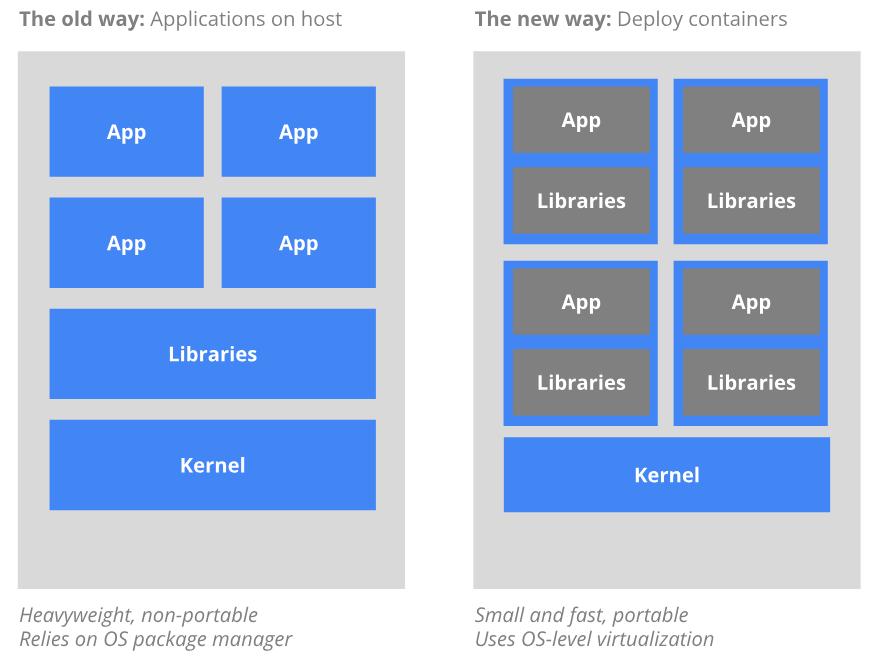
Kubernetes 的好处:
- Planet Scale
- Designed on the same principles that allows Google to run billions of containers a week, Kubernetes can scale without increasing your ops team.
- Never Outgrow
- Whether testing locally or running a global enterprise, Kubernetes flexibility grows with you to deliver your applications consistently and easily no matter how complex your need is.
- Run Anywhere
- Kubernetes is open source giving you the freedom to take advantage of on-premises, hybrid, or public cloud infrastructure, letting you effortlessly move workloads to where it matters to you.
Kubernetes Getting started
- 方案1:minikube
- https://kubernetes.io/docs/setup/minikube/
- 方案2:microk8s
- https://microk8s.io/
- 方案3:Kubernetes on Ubuntu
- https://kubernetes.io/docs/getting-started-guides/ubuntu/
- 方案4:kubeadm
- https://www.digitalocean.com/community/tutorials/how-to-create-a-kubernetes-1-11-cluster-using-kubeadm-on-ubuntu-18-04
- 方案5:Kubernetes + Virtualbox + Vagrant
方案5安装记录
Setting up a distributed Kubernetes cluster along with Istio service mesh locally with Vagrant and VirtualBox for PoC or Demo use cases, see kubernetes-vagrant-centos-cluster.
安装后:
root@ubuntu-s-8vcpu-32gb-sfo2-01:~# kubectl get nodes
NAME    STATUS   ROLES    AGE   VERSION
node1   Ready    <none>   1h    v1.11.0
node2   Ready    <none>   1h    v1.11.0
node3   Ready    <none>   1h    v1.11.0

root@ubuntu-s-8vcpu-32gb-sfo2-01:~# kubectl get namespaces
NAME          STATUS   AGE
default       Active   1h
kube-public   Active   1h
kube-system   Active   1h

root@ubuntu-s-8vcpu-32gb-sfo2-01:~# kubectl cluster-info
Kubernetes master is running at https://172.17.8.101:6443
Heapster is running at https://172.17.8.101:6443/api/v1/namespaces/kube-system/services/heapster/proxy
CoreDNS is running at https://172.17.8.101:6443/api/v1/namespaces/kube-system/services/kube-dns:dns/proxy
Grafana is running at https://172.17.8.101:6443/api/v1/namespaces/kube-system/services/monitoring-grafana/proxy
InfluxDB is running at https://172.17.8.101:6443/api/v1/namespaces/kube-system/services/monitoring-influxdb:http/proxy

To further debug and diagnose cluster problems, use 'kubectl cluster-info dump'.


root@ubuntu-s-8vcpu-32gb-sfo2-01:~# kubectl get pods -n kube-system
NAME                                              READY   STATUS    RESTARTS   AGE
coredns-549f985987-kw5rx                          1/1     Running   0          1h
coredns-549f985987-vqgks                          1/1     Running   0          1h
heapster-v1.5.0-76c9b966c-4dh9p                   4/4     Running   0          50m
kubernetes-dashboard-574589d477-vbs6s             1/1     Running   0          1h
monitoring-influxdb-grafana-v4-5bbb9b766d-8x8bz   2/2     Running   0          52m
traefik-ingress-controller-n2gt6                  1/1     Running   0          1h
常用命令
查看 Kubernetes 集群版本号
root:~$ kubectl version --short 2>/dev/null
Client Version: v1.18.20
Server Version: v1.18.4-tke.20
网络问题排查
问题场景
将一个 OMS 后端服务部署在 Kubernetes 集群上,如何配置网络通信,实现用户通过云下浏览器访问云上的 OMS 服务。
网络拓扑如下:
外部用户浏览器 / curl
        |
        v
DNS
<你的域名>
        |
        v
CLB VIP
80 / 443
        |
        v
Ingress 规则
host/path 匹配
        |
        v
Service
jmesh-namesvr-oms:9200
        |
        v
Pod
9.165.174.104:8081
        |
        v
oms-backend
简化交互版本:
用户
 -> 域名
 -> CLB
 -> Ingress
 -> Service jmesh-namesvr-oms:9200
 -> Endpoint 9.165.174.104:8081
 -> oms-backend
注意:OMS 原始的首页访问路径是
/,因此需要在 Ingress 配置访问的路径是/(即,路径改写),保证请求访问 OMS 实际使用的根路径。
/                      -> 前端页面
/assets/*              -> 前端静态资源
/backend/api/v1/health -> 后端健康检查
ingress 配置:
    - domain: mesh.jlib.woa.com
      path: /
      services:
      - serviceName: jmesh-namesvr-oms
        serviceNamespace: jmesh-namesvr
        servicePort: 9200
        isDirectConnect: true
综合排查思路
当遇到服务 jmesh-namesvr-oms 无法正常访问时,通常可以按以下顺序进行定位:
get svc -o wide:确认服务本身存在,查看其选择器和端口。get endpoints:检查后端 Pod 的 IP 列表是否为空,若为空则服务无可用后端。get pods -l <selector> --show-labels:验证匹配选择器的 Pod 是否正常运行,标签是否一致。describe svc:获取更详细的服务信息和相关事件,进一步定位原因。
这些命令共同构成了 Kubernetes 服务排错的常用链路。
1. 确认应用本身没问题
$ curl -sf http://localhost:8081/backend/api/v1/health
{"code":200,"message":"OMS Backend is running","storage":"etcd","timestamp":"2024-01-01T00:00:00Z"}

$ netstat -lnt | grep 8081
tcp6       0      0 :::8081                 :::*                    LISTEN
2. 确认 Service 层正常
kubectl get svc -n jmesh-namesvr jmesh-namesvr-oms -o wide
kubectl get endpoints -n jmesh-namesvr jmesh-namesvr-oms
kubectl describe svc -n jmesh-namesvr jmesh-namesvr-oms

# 可以直接验证 Service 和后端 Pod 是否正常
# 把本机的 9200 端口,临时转发到 Kubernetes 集群里 jmesh-namesvr-oms 这个 Service 的 9200 端口
# 这个转发只在 kubectl port-forward 命令运行期间有效,Ctrl+C 就断开了
kubectl -n jmesh-namesvr port-forward svc/jmesh-namesvr-oms 9200:9200
另开一个终端:
# 通过上面 port-forward 判断问题是在 应用 / Service,还是在 Ingress / NodePort / 外部网络
curl -sv http://127.0.0.1:9200/backend/api/v1/health
curl -sv http://127.0.0.1:9200/
# or
root:~$ nc -vz 127.0.0.1 9200
127.0.0.1 (127.0.0.1:9200) open

root:~$ printf 'GET /backend/api/v1/health HTTP/1.1\r\nHost: 127.0.0.1\r\nConnection: close\r\n\r\n' | nc 127.0.0.1 9200
HTTP/1.1 200 OK
Content-Type: application/json; charset=utf-8
Date: Wed, 01 Apr 2026 02:54:58 GMT
Content-Length: 99
Connection: close

{"code":200,"message":"OMS Backend is running","storage":"etcd","timestamp":"2024-01-01T00:00:00Z"}
具体 kubectl 执行步骤:
- kubectl get svc -n jmesh-namesvr jmesh-namesvr-oms -o wide
作用:获取指定命名空间 jmesh-namesvr 中名为 jmesh-namesvr-oms 的服务(Service)的详细信息,并以宽格式(-o wide)输出,显示比默认输出更多的字段,例如服务的 Cluster IP、外部 IP(如果有)、端口映射、选择器(Selector) 等。
输出示例:
root:~$ kubectl get svc -n jmesh-namesvr jmesh-namesvr-oms -o wide
NAME                TYPE       CLUSTER-IP      EXTERNAL-IP   PORT(S)          AGE   SELECTOR
jmesh-namesvr-oms   NodePort   9.165.175.237   <none>        9200:31457/TCP   10m   app.kubernetes.io/instance=jmesh-namesvr-oms,app.kubernetes.io/name=jmesh-namesvr-oms
使用场景:
- 快速查看服务的 IP 地址、端口 和 选择器,确认服务是否已正确创建。
- 验证服务的 类型(ClusterIP、NodePort、LoadBalancer 等)和 外部访问方式。
- 结合
-o wide可看到选择器,为后续排查 Pod 是否匹配提供依据。
- kubectl get endpoints -n jmesh-namesvr jmesh-namesvr-oms
作用:获取与服务 jmesh-namesvr-oms 关联的 Endpoints 资源。Endpoints 记录了该服务当前实际转发流量的后端 Pod 的 IP 地址和端口列表。这些信息由 Kubernetes 根据服务选择器自动维护。
输出示例:
root:~$ kubectl get endpoints -n jmesh-namesvr jmesh-namesvr-oms
NAME                ENDPOINTS            AGE
jmesh-namesvr-oms   9.165.169.113:8081   15m
使用场景:
- 检查服务后端是否有健康的
Pod:如果ENDPOINTS列为空,说明没有符合条件的Pod正在运行,服务将无法正常转发流量。 - 确认
Pod的IP和端口是否与预期一致,常用于调试服务不可达的问题。 - 验证服务选择器是否正确匹配到了
Pod。
- kubectl get pods -n jmesh-namesvr -l app.kubernetes.io/name=jmesh-namesvr-oms –show-labels
作用:列出命名空间 jmesh-namesvr 中所有带标签 app.kubernetes.io/name=jmesh-namesvr-oms 的 Pod,并显示每个 Pod 的标签(--show-labels)。标签通常用于服务选择器关联 Pod。
输出示例:
root:~$ kubectl get pods -n jmesh-namesvr -l app.kubernetes.io/name=jmesh-namesvr-oms --show-labels
NAME                                 READY   STATUS    RESTARTS   AGE   LABELS
jmesh-namesvr-oms-8489564d64-bgzgk   1/1     Running   0          15m   app.kubernetes.io/instance=jmesh-namesvr-oms,app.kubernetes.io/name=jmesh-namesvr-oms,io.tencent.bcs.clusterid=BCS-K8S-26067,io.tencent.bcs.controller.name=jmesh-namesvr-oms,io.tencent.bcs.controller.type=Deployment,io.tencent.bcs.namespace=jmesh-namesvr,io.tencent.paas.projectid=4d7b969b89c94ebcbac2338e2f5ff845,io.tencent.paas.source_type=helm,pod-template-hash=8489564d64
使用场景:
- 确认服务选择器匹配的 Pod 是否正常运行(状态为
Running,READY为 1/1)。 - 查看
Pod的详细标签,与服务的selector进行比对,确保匹配正确。 - 如果服务
Endpoints为空,可通过此命令查看是否存在符合条件的Pod,以及它们的状态是否健康。
- kubectl describe svc -n jmesh-namesvr jmesh-namesvr-oms
作用:以详细描述的方式展示服务 jmesh-namesvr-oms 的完整信息,包括元数据、选择器、端口、Endpoints 列表、事件(Events)等。describe 命令提供比 get 更丰富的信息,尤其适合故障排查。
输出示例:
root:~$ kubectl get pods -n jmesh-namesvr -l app.kubernetes.io/name=jmesh-namesvr-oms --show-labels
NAME                                 READY   STATUS    RESTARTS   AGE   LABELS
jmesh-namesvr-oms-8489564d64-bgzgk   1/1     Running   0          15m   app.kubernetes.io/instance=jmesh-namesvr-oms,app.kubernetes.io/name=jmesh-namesvr-oms,io.tencent.bcs.clusterid=BCS-K8S-26067,io.tencent.bcs.controller.name=jmesh-namesvr-oms,io.tencent.bcs.controller.type=Deployment,io.tencent.bcs.namespace=jmesh-namesvr,io.tencent.paas.projectid=4d7b969b89c94ebcbac2338e2f5ff845,io.tencent.paas.source_type=helm,pod-template-hash=8489564d64
root:~$
root:~$ kubectl describe svc -n jmesh-namesvr jmesh-namesvr-oms
Name:                     jmesh-namesvr-oms
Namespace:                jmesh-namesvr
Labels:                   app.kubernetes.io/instance=jmesh-namesvr-oms
                          app.kubernetes.io/managed-by=Helm
                          app.kubernetes.io/name=jmesh-namesvr-oms
                          app.kubernetes.io/version=1.0.0
                          helm.sh/chart=jmesh-namesvr-oms-1.0.0
                          io.tencent.bcs.clusterid=BCS-K8S-26067
                          io.tencent.bcs.controller.name=jmesh-namesvr-oms
                          io.tencent.bcs.controller.type=Service
                          io.tencent.bcs.namespace=jmesh-namesvr
                          io.tencent.paas.creator=gerryyang
                          io.tencent.paas.projectid=4d7b969b89c94ebcbac2338e2f5ff845
                          io.tencent.paas.source_type=helm
                          io.tencent.paas.updator=gerryyang
Annotations:              io.tencent.bcs.clusterid: BCS-K8S-26067
                          io.tencent.paas.creator: gerryyang
                          io.tencent.paas.updator: gerryyang
                          io.tencent.paas.version: 1.0.0
                          meta.helm.sh/release-name: jmesh-namesvr-oms
                          meta.helm.sh/release-namespace: jmesh-namesvr
Selector:                 app.kubernetes.io/instance=jmesh-namesvr-oms,app.kubernetes.io/name=jmesh-namesvr-oms
Type:                     NodePort
IP:                       9.165.175.237
Port:                     service  9200/TCP
TargetPort:               8081/TCP
NodePort:                 service  31457/TCP
Endpoints:                9.165.169.113:8081
Session Affinity:         None
External Traffic Policy:  Cluster
Events:
  Type    Reason           Age   From                Message
  ----    ------           ----  ----                -------
  Normal  EnsuringService  16m   service-controller  Deleted Loadbalancer
使用场景:
- 全面查看服务的配置细节,包括选择器、端口映射、会话亲和性等。
- 查看与该服务相关的事件(Events),例如是否有调度失败、负载均衡器配置错误等,帮助定位问题。
- 当服务行为异常(如无法访问)时,describe 是最常用的初步诊断工具之一。
3. 检查 Ingress 资源是否正确指向 OMS Service
重点看:
- host 是否是你的域名
- path 是否符合预期
- backend service 是否是 jmesh-namesvr-oms
- backend service port 是否是 9200
- ingress class / annotations 是否和 BCS CLB 控制器匹配
查询标准 Kubernetes Ingress:(标准 Ingress:networking.k8s.io/v1)
kubectl get ingress -n jmesh-namesvr
kubectl describe ingress -n jmesh-namesvr <ingress-name>
kubectl get ingress -n jmesh-namesvr <ingress-name> -o yaml
查询 BCS 自定义 Ingress CRD:(BCS 自定义 Ingress:networkextension.bkbcs.tencent.com/v1)
# 用带 group 的资源名查
root:~$ kubectl get ingresses.networkextension.bkbcs.tencent.com -n dev
NAME      AGE
jlibwoa   515d
# 查单个对象
kubectl get ingresses.networkextension.bkbcs.tencent.com -n dev jlibwoa -o yaml
# 查看这个 group 下有哪些资源
root:~$ kubectl api-resources --api-group=networkextension.bkbcs.tencent.com
NAME           SHORTNAMES   APIGROUP                             NAMESPACED   KIND
ingresses      bcsingress   networkextension.bkbcs.tencent.com   true         Ingress
listeners                   networkextension.bkbcs.tencent.com   true         Listener
portbindings                networkextension.bkbcs.tencent.com   true         PortBinding
portpools                   networkextension.bkbcs.tencent.com   true         PortPool
Refer
- https://github.com/kubernetes/kubernetes
- 15 years of experience of running production workloads at Google
- jimmysong-istio-handbook