Specification-Driven Development (SDD) in Action
- Specification-Driven Development (SDD)
- SDD vs. Other Methodologies
- Spec-kit
- Refer
Specification-Driven Development (SDD)
Spec-driven development means writing a “spec” before writing code with AI (“documentation first”). The spec becomes the source of truth for the human and the AI.
A spec is a structured, behavior-oriented artifact - or a set of related artifacts - written in natural language that expresses software functionality and serves as guidance to AI coding agents. Each variant of spec-driven development defines their approach to a spec’s structure, level of detail, and how these artifacts are organized within a project.
Specification-Driven Development (SDD) is a software development methodology where the creation of a detailed, precise, and often formal specification is the first and most critical step in the development process. This specification acts as the single source of truth for what the system must do, before any code is written to define how it does it.
The core philosophy is: “Define it perfectly, then build it exactly.”
Specification-Driven Development is a powerful, rigorous (严格缜密的) approach that is particularly well-suited for safety-critical systems (aerospace, medical), complex distributed systems (databases, consensus algorithms), and public APIs where correctness, stability, and clear contracts are paramount.
While it may be too heavy-weight for every project, the core principles—writing precise specifications first, using them to drive automation, and validating designs before implementation—are valuable lessons that can be applied to any development process.
SDD vs. Other Methodologies
| Feature | Specification-Driven (SDD) |
Test-Driven (TDD) |
Behavior-Driven (BDD) |
|---|---|---|---|
| Primary Artifact | Formal Specification | Failing Unit Test | Behavioral Scenarios (in Gherkin) |
| Focus | What the system is (design & contract) | How a unit should behave (code design) | How the system should behave for users (collaboration) |
| Scope | System-level, architectural | Code-level, component-level | Feature-level, user interaction |
| Formality | High (can be mathematical) | Low to Medium (code) | Medium (structured natural language) |
| When is it “Done”? | When implementation conforms to the spec. | When the test passes and code is refactored. | When the scenario passes. |
Crucially, they are complementary. SDD can be seen as a higher-level, design-phase methodology that feeds into TDD/BDD at the implementation phase.
Advantages of SDD
-
Reduces Defects Early: Catches logical errors, edge cases, and design flaws in the specification phase, when they are cheapest to fix.
-
Eliminates Ambiguity: Creates a clear, unambiguous contract for the team.
-
Enables Automation: Automates boilerplate coding and, most importantly, testing.
-
Improves Documentation: The specification is the documentation, and it’s always in sync with the implementation.
-
Facilitates Collaboration: Provides a precise medium for developers, architects, and product managers to communicate.
Disadvantages of SDD
-
Steep Learning Curve: Formal specification languages can be difficult to learn and require a different skillset.
-
Initial Overhead: Writing a detailed spec takes significant time and effort upfront, which can feel slow at the start of a project.
-
Potential for Rigidity: If requirements change frequently, maintaining the formal specification can become a bottleneck (this is why iterative cycles are important).
-
Over-Engineering Risk: It’s possible to over-specify a simple system, wasting effort.
Spec-kit

Spec-Driven Development flips (快速翻阅) the script on traditional software development. For decades, code has been king — specifications were just scaffolding we built and discarded once the “real work” of coding began. Spec-Driven Development changes this: specifications become executable, directly generating working implementations rather than just guiding them.
Spec-kit is GitHub’s version of SDD. It is distributed as a CLI that can create workspace setups for a wide range of common coding assistants. Once that structure is set up, you interact with spec-kit via slash commands in your coding assistant.
Workflow: Constitution → 𝄆 Specify → Plan → Tasks 𝄇
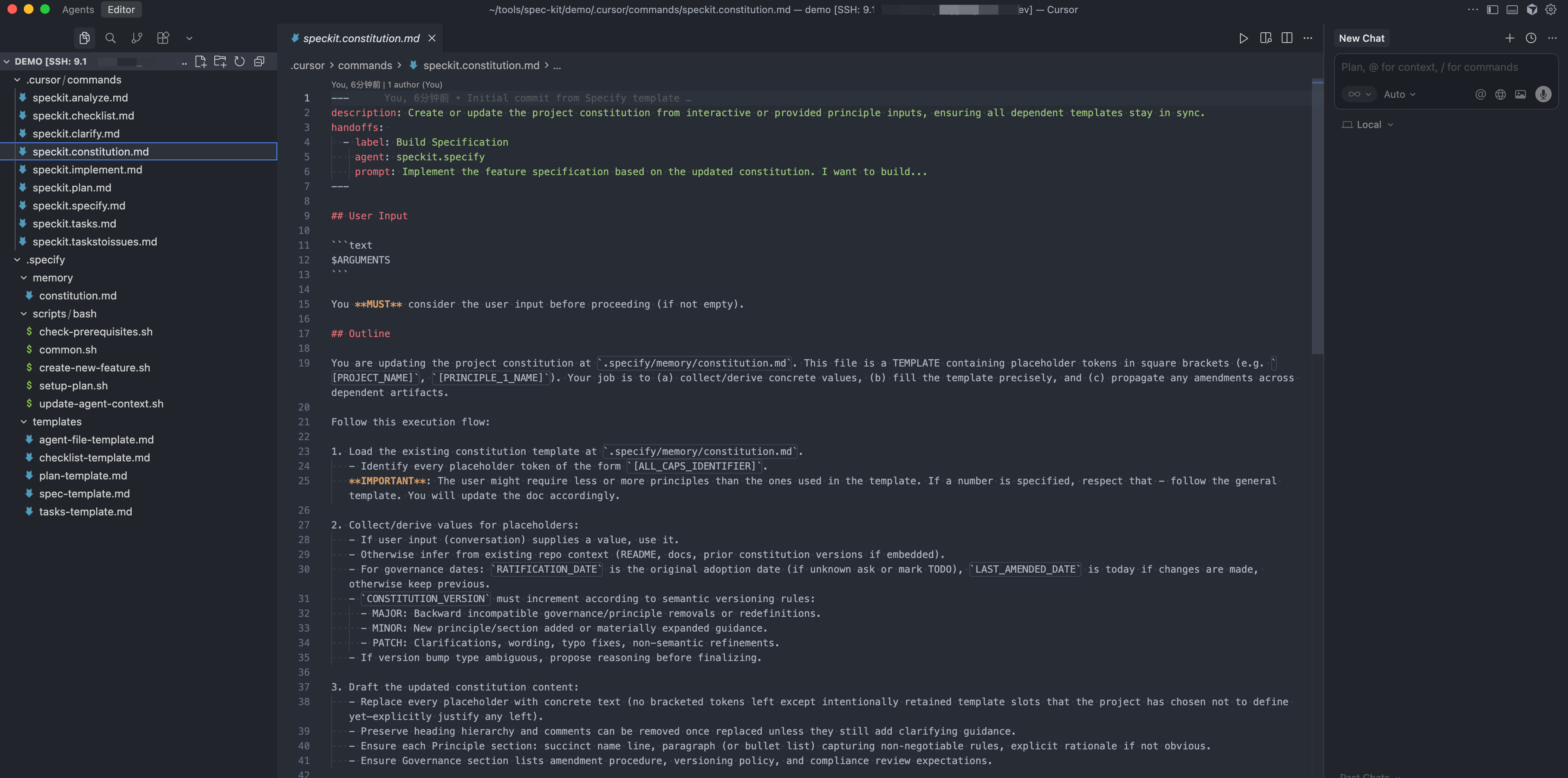
Spec-kit’s memory bank concept is a prerequisite for the spec-driven approach. They call it a constitution (宪法; 章程). The constitution is supposed to contain the high level principles that are “immutable” (永恒的; 永远不变的) and should always be applied, to every change. It’s basically a very powerful rules file that is heavily used by the workflow.
In each of the workflow steps (specify, plan, tasks), spec-kit instantiates a set of files and prompts with the help of a bash script and some templates. The workflow then makes heavy use of checklists inside of the files, to track necessary user clarifications, constitution violations, research tasks, etc. They are like a “definition of done” for each workflow step (though interpreted by AI, so there is no 100% guarantee that they will be respected).
Core Philosophy
Spec-Driven Development is a structured process that emphasizes:
- Intent-driven development where specifications define the “what” before the “how”
- Rich specification creation using guardrails and organizational principles
- Multi-step refinement rather than one-shot code generation from prompts
- Heavy reliance on advanced AI model capabilities for specification interpretation
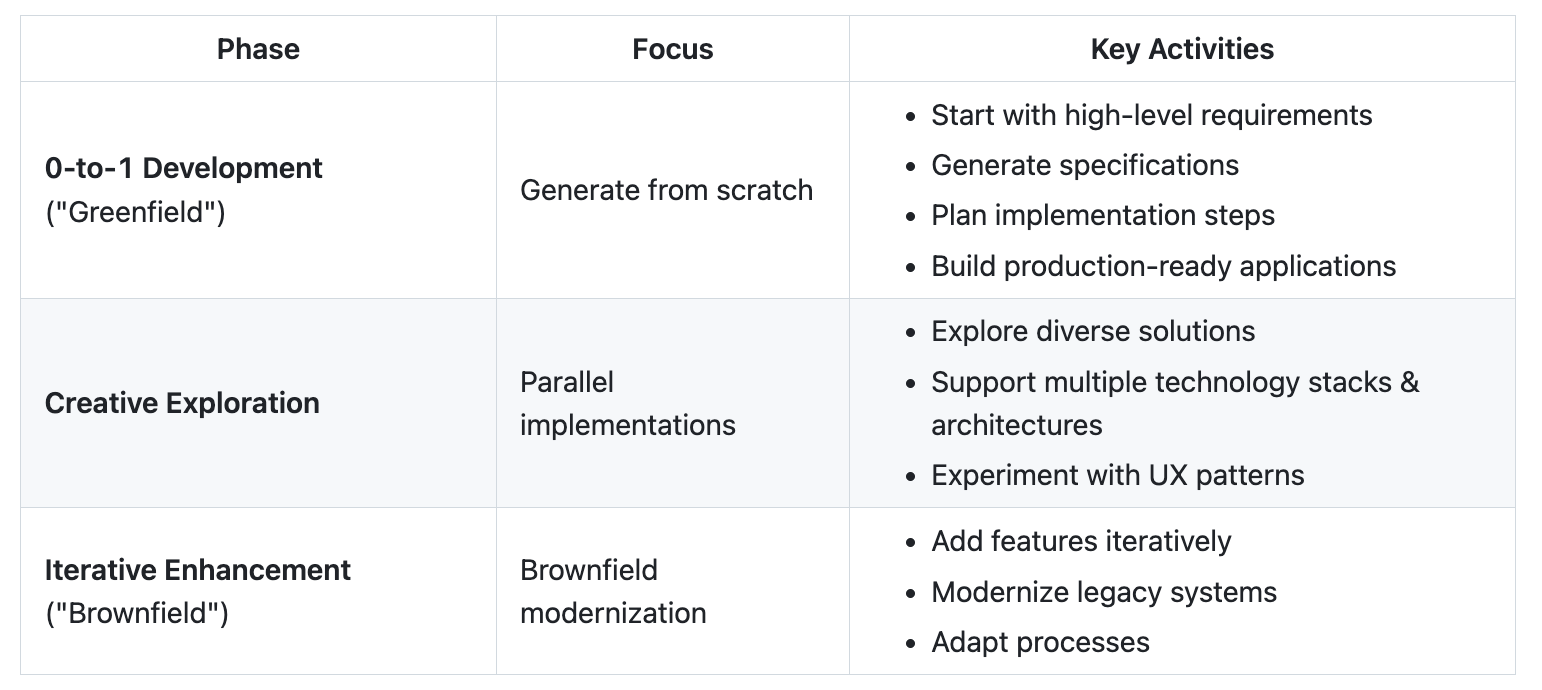
Development Phases
Get Started
Prerequisites
- Linux/macOS/Windows
- Supported AI coding agent.
- uv for package management
- Python 3.11+
- Git
Install Specify CLI
Persistent Installation (Recommended)
Install once and use everywhere:
uv tool install specify-cli --from git+https://github.com/github/spec-kit.git
uv: An extremely fast Python package manager

Then use the tool directly:
specify init <PROJECT_NAME>
specify check
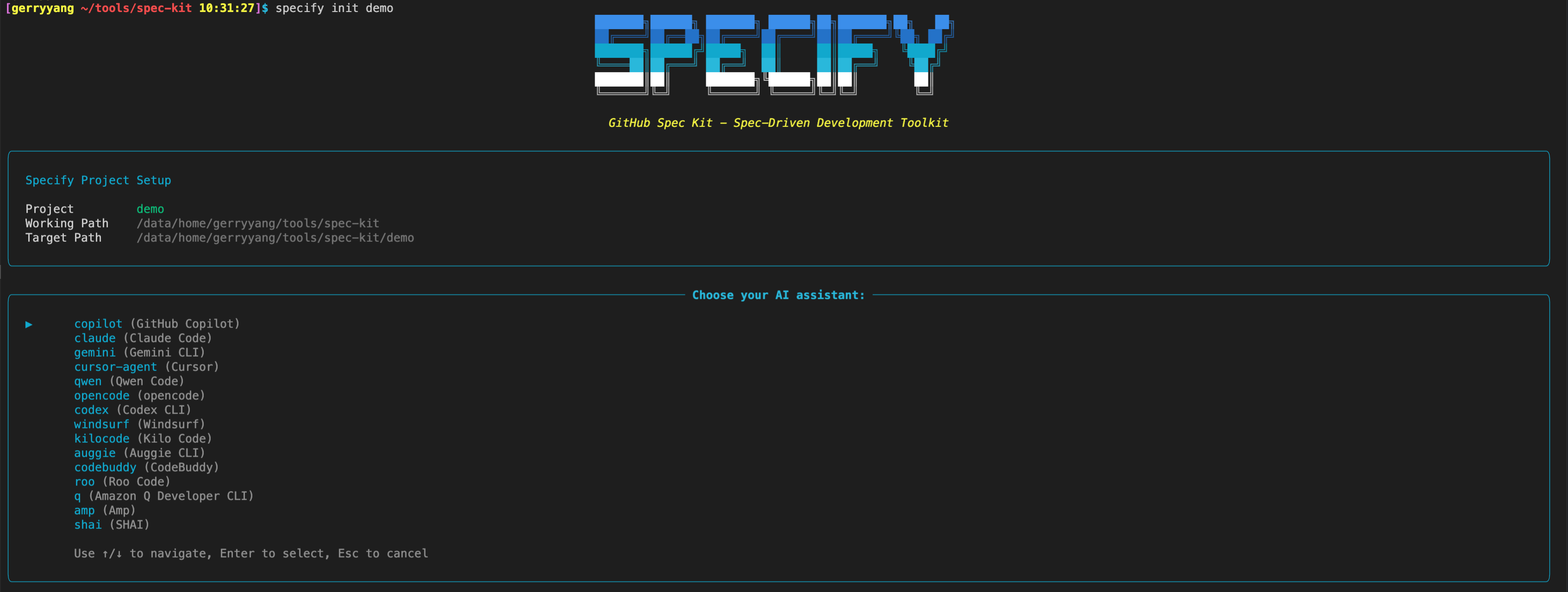

To upgrade Specify, see the Upgrade Guide for detailed instructions. Quick upgrade:
uv tool install specify-cli --force --from git+https://github.com/github/spec-kit.git
Establish project principles
Launch your AI assistant in the project directory. The /speckit.* commands are available in the assistant.
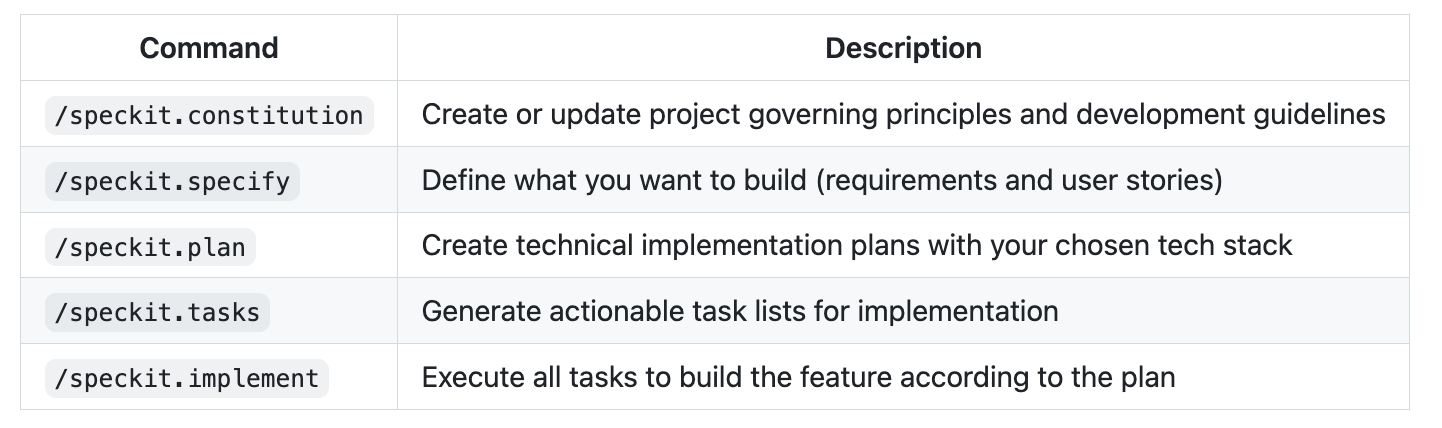
Use the /speckit.constitution command to create your project’s governing principles and development guidelines that will guide all subsequent development.
/speckit.constitution Create principles focused on code quality, testing standards, user experience consistency, and performance requirements
Create the spec
Use the /speckit.specify command to describe what you want to build. Focus on the what and why, not the tech stack.
/speckit.specify Build an application that can help me organize my photos in separate photo albums. Albums are grouped by date and can be re-organized by dragging and dropping on the main page. Albums are never in other nested albums. Within each album, photos are previewed in a tile-like interface.
Create a technical implementation plan
Use the /speckit.plan command to provide your tech stack and architecture choices.
/speckit.plan The application uses Vite with minimal number of libraries. Use vanilla HTML, CSS, and JavaScript as much as possible. Images are not uploaded anywhere and metadata is stored in a local SQLite database.
Break down into tasks
Use /speckit.tasks to create an actionable task list from your implementation plan.
/speckit.tasks
Execute implementation
Use /speckit.implement to execute all tasks and build your feature according to the plan.
/speckit.implement
For detailed step-by-step instructions, see our comprehensive guide.
Available Slash Commands
After running specify init, your AI coding agent will have access to these slash commands for structured development:
Core Commands
Essential commands for the Spec-Driven Development workflow:
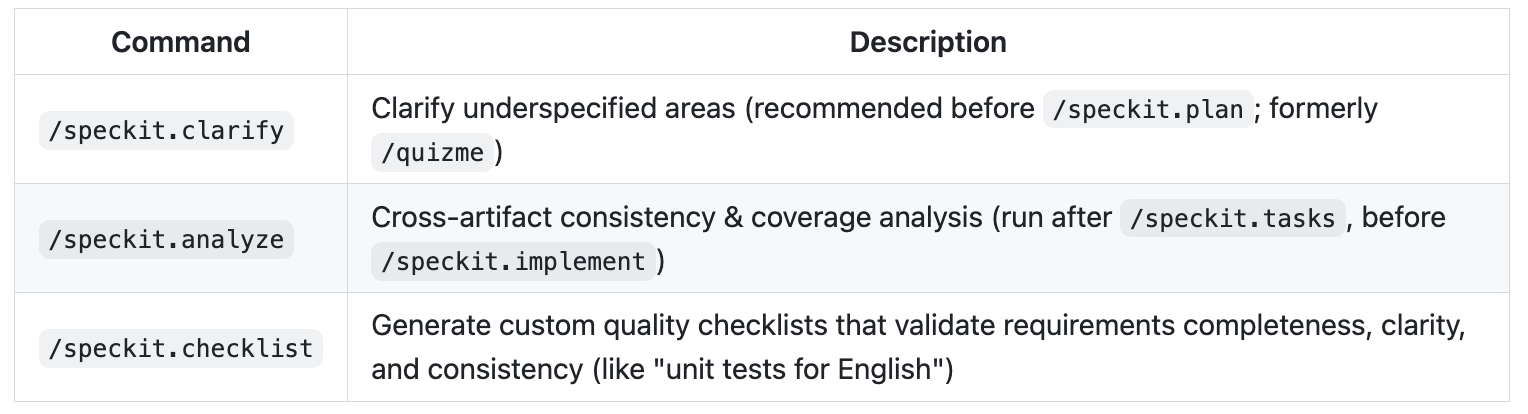
Optional Commands
Additional commands for enhanced quality and validation:
Spec-driven development with AI: Get started with a new open source toolkit
Developers can use their AI tool of choice for spec-driven development with this open source toolkit.
As coding agents have grown more powerful, a pattern has emerged: you describe your goal, get a block of code back, and often… it looks right, but doesn’t quite work. This “vibe-coding” approach can be great for quick prototypes, but less reliable when building serious, mission-critical applications or working with existing codebases.
Sometimes the code doesn’t compile. Sometimes it solves part of the problem but misses the actual intent. The stack or architecture may not be what you’d choose.
The issue isn’t the coding agent’s coding ability, but our approach. We treat coding agents like search engines when we should be treating them more like literal-minded pair programmers. They excel at pattern recognition but still need unambiguous (明了的; 无歧义的) instructions.
That’s why we’re rethinking specifications — not as static documents, but as living, executable artifacts that evolve with the project. Specs become the shared source of truth. When something doesn’t make sense, you go back to the spec; when a project grows complex, you refine it; when tasks feel too large, you break them down (当事情令人费解时,就回归规范;当项目日趋复杂时,就完善规范;当任务显得庞大时,就化整为零).
Spec Kit, our new open sourced toolkit for spec-driven development, provides a structured process to bring spec-driven development to your coding agent workflows with tools including GitHub Copilot, Claude Code, and Gemini CLI.
What is the spec-driven process with Spec Kit?
Spec Kit makes your specification the center of your engineering process. Instead of writing a spec and setting it aside, the spec drives the implementation, checklists, and task breakdowns. Your primary role is to steer; the coding agent does the bulk of the writing.
It works in four phases with clear checkpoints. But here’s the key insight: each phase has a specific job, and you don’t move to the next one until the current task is fully validated.
Here’s how the process breaks down:
-
Specify: You provide a high-level description of what you’re building and why, and the coding agent generates a detailed specification. This isn’t about technical stacks or app design. It’s about user journeys, experiences, and what success looks like. Who will use this? What problem does it solve for them? How will they interact with it? What outcomes matter? Think of it as mapping the user experience you want to create, and letting the coding agent flesh out the details. Crucially, this becomes a living artifact that evolves as you learn more about your users and their needs.
-
Plan: Now you get technical. In this phase, you provide the coding agent with your desired stack, architecture, and constraints, and the coding agent generates a comprehensive technical plan. If your company standardizes on certain technologies, this is where you say so. If you’re integrating with legacy systems, have compliance requirements, or have performance targets you need to hit … all of that goes here. You can also ask for multiple plan variations to compare and contrast different approaches. If you make your internal docs available to the coding agent, it can integrate your architectural patterns and standards directly into the plan. After all, a coding agent needs to understand the rules of the game before it starts playing.
-
Tasks: The coding agent takes the spec and the plan and breaks them down into actual work. It generates small, reviewable chunks that each solve a specific piece of the puzzle. Each task should be something you can implement and test in isolation; this is crucial because it gives the coding agent a way to validate its work and stay on track, almost like a test-driven development process for your AI agent. Instead of “build authentication,” you get concrete tasks like “create a user registration endpoint that validates email format.”
-
Implement: Your coding agent tackles the tasks one by one (or in parallel, where applicable). But here’s what’s different: instead of reviewing thousand-line code dumps, you, the developer, review focused changes that solve specific problems. The coding agent knows what it’s supposed to build because the specification told it. It knows how to build it because the plan told it. And it knows exactly what to work on because the task told it.
Crucially, your role isn’t just to steer. It’s to verify. At each phase, you reflect and refine. Does the spec capture what you actually want to build? Does the plan account for real-world constraints? Are there omissions or edge cases the AI missed? The process builds in explicit checkpoints for you to critique what’s been generated, spot gaps, and course correct before moving forward. The AI generates the artifacts; you ensure they’re right.
How to use Spec Kit in your agentic workflows
Spec Kit works with coding agents like GitHub Copilot, Claude Code, and Gemini CLI. The key is to use a series of simple commands to steer the coding agent, which then does the hard work of generating the artifacts for you.
Setting it up is straightforward. First, install the specify command-line tool. This tool initializes your project and sets up the necessary structure.
uvx --from git+https://github.com/github/spec-kit.git
specify init <PROJECT_NAME>
Once your project is initialized, use the /specify command to provide a high-level prompt, and the coding agent generates the full spec. Focus on the “what” and “why” of your project, not the technical details.
Next, use the /plan command to steer the coding agent to create a technical implementation plan. Here, you provide the high-level technical direction, and the coding agent will generate a detailed plan that respects your architecture and constraints.
Finally, use the /tasks command to make the coding agent break down the specification and plan into a list of actionable tasks. Your coding agent will then use this list to implement the project requirements.
This structured workflow turns vague prompts into clear intent that coding agents can reliably execute.
But why does this approach succeed where vague (含糊的) prompting fails?
Why this works
This approach succeeds where “just prompting the AI” fails due to a basic truth about how language models work: they’re exceptional at pattern completion, but not at mind reading. A vague prompt like “add photo sharing to my app” forces the model to guess at potentially thousands of unstated requirements. The AI will make reasonable assumptions, and some will be wrong (and you often won’t discover which aren’t quite right until deep into your implementation).
By contrast, providing a clear specification up front, along with a technical plan and focused tasks, gives the coding agent more clarity, improving its overall efficacy. Instead of guessing at your needs, it knows what to build, how to build it, and in what sequence.
This is why the approach works across different technology stacks. Whether you’re building in Python, JavaScript, or Go, the fundamental challenge is the same: translating your intent into working code. The specification captures the intent clearly, the plan translates it into technical decisions, the tasks break it into implementable pieces, and your AI coding agent handles the actual coding.
For larger organizations, this solves another critical problem: Where do you put all your requirements around security policies, compliance rules, design system constraints, and integration needs? Often, these things either live in someone’s head, are buried in a wiki that nobody reads, or are scattered across Slack conversations that are impossible to find later.
With Spec Kit, all of that stuff goes in the specification and the plan, where the AI can actually use it. Your security requirements aren’t afterthoughts; they’re baked into the spec from day one. And your design system isn’t something you bolt on later. It’s part of the technical plan that guides implementation.
The iterative nature of this approach is what gives it power. Where traditional development locks you into early decisions, spec-driven makes changing course simple: just update the spec, regenerate the plan, and let the coding agent handle the rest.
这段话的核心在于阐明 “规范化驱动”的方法为何比“直接向 AI 提需求”更有效,并解释了它在不同规模项目中的优势。
这段话雄辩地论证了,规范化驱动开发的成功在于它尊重并利用了AI的工作机制(模式补全),同时弥补了它的短板(缺乏上下文和意图理解)。
- 对 AI 而言: 它从一个需要猜谜的“黑盒”变成了一个拥有清晰指令的“强大执行工具”。
- 对团队而言: 它将模糊的需求和隐性的知识变得明确、可执行、可迭代。
- 对项目而言: 它提高了代码质量,降低了后期返工的风险,并赋予了项目极大的灵活性。
最终,这是一种将人类的设计与规划能力,与 AI 的快速执行能力相结合的高效范式。
3 places this approach works really well
Spec-driven development is especially useful in three scenarios:
-
Greenfield (zero-to-one): When you’re starting a new project, it’s tempting to just start coding. But a small amount of upfront work to create a spec and a plan ensures the AI builds what you actually intend, not just a generic solution based on common patterns.
-
Feature work in existing systems (N-to-N+1): This is where spec-driven development is most powerful. Adding features to a complex, existing codebase is hard. By creating a spec for the new feature, you force clarity on how it should interact with the existing system. The plan then encodes the architectural constraints, ensuring the new code feels native to the project instead of a bolted-on addition. This makes ongoing development faster and safer. To make this work, advanced context engineering practices might be needed — we’ll cover those separately.
-
Legacy modernization: When you need to rebuild a legacy system, the original intent is often lost to time. With the spec-driven development process offered in Spec Kit, you can capture the essential business logic in a modern spec, design a fresh architecture in the plan, and then let the AI rebuild the system from the ground up, without carrying forward inherited technical debt.
The core benefit is separating the stable “what” from the flexible “how,” enabling iterative development without expensive rewrites. This allows you to build multiple versions and experiment quickly.
Where we’re headed
We’re moving from “code is the source of truth” to “intent is the source of truth.” With AI the specification becomes the source of truth and determines what gets built.
This isn’t because documentation became more important. It’s because AI makes specifications executable. When your spec turns into working code automatically, it determines what gets built.
Spec Kit is our experiment in making that transition real. We open sourced it because this approach is bigger than any one tool or company. The real innovation is the process. There is more here that we’ll cover soon, specifically around how you can combine spec-driven development practices with context engineering to build more advanced capabilities in your AI toolkit.
And we’d love to hear how it works for you and what we can improve! If you’re building with spec-driven patterns, share your experience with us. We’re particularly curious about:
- Making the workflow more engaging and usable: Reading walls of text can be tedious. How do we make this process genuinely enjoyable?
- Possible VS Code integrations: We’re exploring ways to bring this workflow directly into VS Code. What would feel most natural to you?
- Comparing and diffing multiple implementations: Iterating and diffing between implementations opens up creative possibilities. What would be most valuable here?
- Managing specs and tasks at scale in your organization: Managing lots of Markdown files can get overwhelming. What would help you stay organized and focused?
We’re excited to see you leverage AI to figure out better ways to translate human creativity into working software.
The ONLY guide you’ll need for GitHub Spec Kit
If you’re curious about Spec-Driven Development, as well as what GitHub announced with the latest experimental Spec Kit project, this video is for you. It walks you through the process, what specifications are responsible for, and how you can use Spec Kit to build both new projects and evolve existing software that you already maintain.
Refer
- Understanding Spec-Driven-Development: Kiro, spec-kit, and Tessl
- https://github.com/github/spec-kit/blob/main/spec-driven.md
- Complete Spec-Driven Development Methodology - Deep dive into the full process
- Detailed Walkthrough - Step-by-step implementation guide