Using Go Modules
- Package Management(包管理演进)
- Using Go Modules(使用 Go Modules)
- Creating a new module(创建新 module)
- Adding a dependency(添加依赖)
- Call local module(调用本地 module)
- Upgrading dependencies(升级依赖)
- Adding a dependency on a new major version(添加新 major 版本依赖)
- Upgrading a dependency to a new major version(升级到新的 major 版本)
- Removing unused dependencies(移除未使用的依赖)
- Call this module from another module(从其它 module 调用本 module)
- Build commands(构建相关命令)
- Conclusion(小结)
- Q&A(常见问题)
- Refer(参考)
Package Management(包管理演进)
- Golang 刚诞生时并不支持版本管理,
GOPATH方式只能算是包管理的基本雏形 - 经过一系列演变,社区先后支持了
godep,glide等工具 - 直到2016年,官方才提出采用外部依赖包的方式,引入了
vendor机制 - 2017年推出的
dep工具,基本可以作为准官方的解决方案 - 2019年
go modules的推出,Golang 的包管理争论才最终尘埃落定,一统江湖
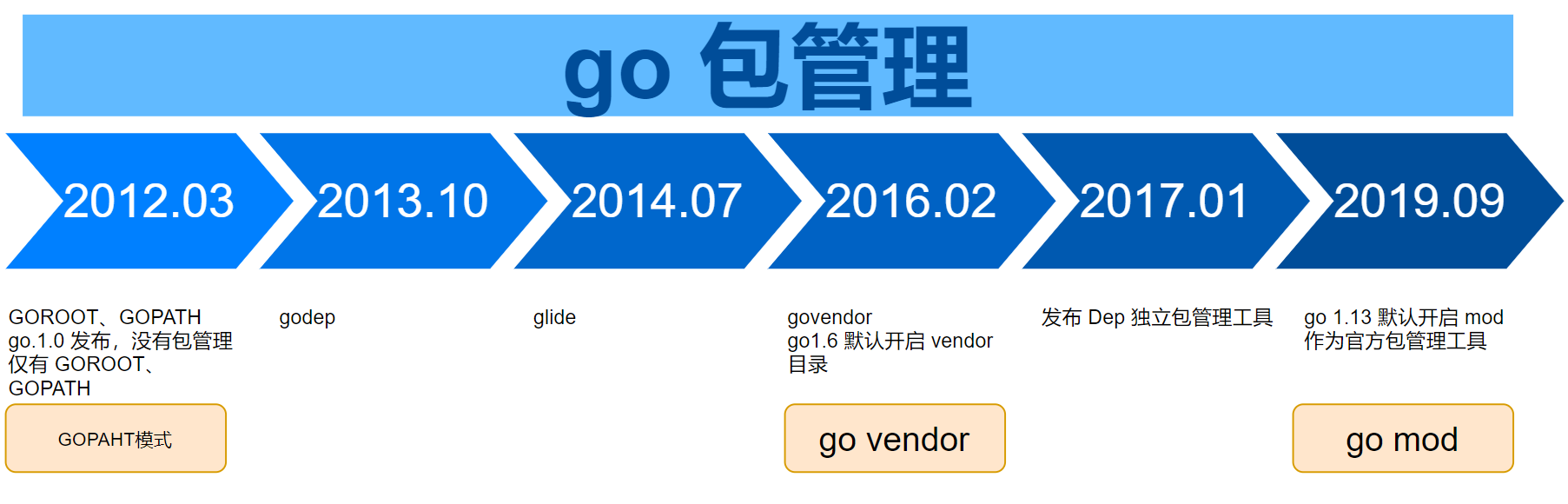
Using Go Modules(使用 Go Modules)
Go 1.11 adds preliminary support for a new concept called modules, an alternative to GOPATH with integrated support for versioning and package distribution. Using modules, developers are no longer confined to working inside GOPATH, version dependency information is explicit yet lightweight, and builds are more reliable and reproducible.
Go 1.11初步引入了 modules 概念,作为GOPATH的替代方案,并内置版本管理与包分发能力。使用 modules 后,开发不再局限于GOPATH目录;依赖版本信息显式且轻量,构建也更可靠、可复现。
Modules are how Go manages dependencies.
Module 是 Go 管理依赖的基本单位。
A module is a collection of packages that are released, versioned, and distributed together. Modules may be downloaded directly from version control repositories or from module proxy servers.
一个 module 是一组一起发布、一起版本化、一起分发的包;可从版本库或 module 代理服务器下载。
For a series of tutorials on modules, see https://golang.org/doc/tutorial/create-module.
For a detailed reference on modules, see https://golang.org/ref/mod.
入门教程见 create-module;详细参考见 go.mod 参考。
By default, the go command may download modules from https://proxy.golang.org. It may authenticate modules using the checksum database at https://sum.golang.org. Both services are operated by the Go team at Google. The privacy policies for these services are available at https://proxy.golang.org/privacy and https://sum.golang.org/privacy, respectively.
默认情况下,
go命令从 proxy.golang.org 下载 module,并通过 sum.golang.org 校验和数据库验证完整性;两项服务均由 Google Go 团队运营,隐私政策见各自站点。
The go command’s download behavior may be configured using GOPROXY, GOSUMDB, GOPRIVATE, and other environment variables. See go help environment and https://golang.org/ref/mod#private-module-privacy for more information.
下载行为可通过
GOPROXY、GOSUMDB、GOPRIVATE等环境变量配置;详见go help environment与私有 module 说明。
A module is a collection of Go packages stored in a file tree with a go.mod file at its root. The go.mod file defines the module’s module path, which is also the import path used for the root directory, and its dependency requirements, which are the other modules needed for a successful build. Each dependency requirement is written as a module path and a specific semantic version.
module 是文件树中的一组
Go包,根目录有go.mod。该文件声明 module 路径(也是根目录的 import 路径)以及构建所需的其它 module 及其语义化版本。
As of Go 1.11, the go command enables the use of modules when the current directory or any parent directory has a go.mod, provided the directory is outside $GOPATH/src. (Inside $GOPATH/src, for compatibility, the go command still runs in the old GOPATH mode, even if a go.mod is found. See the go command documentation for details.) Starting in Go 1.13, module mode will be the default for all development.
自
Go 1.11起,当前目录或其父目录存在go.mod且位于$GOPATH/src之外时,启用 module 模式;在$GOPATH/src内为兼容仍走旧GOPATH模式。自Go 1.13起,module 模式成为默认开发模式。详见 go 命令文档。
Creating a new module(创建新 module)
Create a new, empty directory somewhere outside $GOPATH/src, cd into that directory, and then create a new source file, hello.go:
在
$GOPATH/src之外新建空目录,进入后创建hello.go:
package hello

func Hello() string {
    return "Hello, world."
}
Let’s write a test, too, in hello_test.go:
再在
hello_test.go中编写测试:
package hello

import "testing"

func TestHello(t *testing.T) {
    want := "Hello, world."
    if got := Hello(); got != want {
        t.Errorf("Hello() = %q, want %q", got, want)
    }
}
At this point, the directory contains a package, but not a module, because there is no go.mod file.
此时目录里只有 package,还没有 module,因为尚未创建
go.mod。
Let’s make the current directory the root of a module by using go mod init and then try go test:
用
go mod init将当前目录初始化为 module 根目录,然后运行go test:
$ go mod init github.com/gerryyang/goinaction/module/hello
go: creating new go.mod: module github.com/gerryyang/goinaction/module/hello
go: to add module requirements and sums:
        go mod tidy
$ ls
go.mod  hello.go  hello_test.go
$ cat go.mod
module github.com/gerryyang/goinaction/module/hello

go 1.16
$ go test
PASS
ok      github.com/gerryyang/goinaction/module/hello    0.006s
Congratulations! You’ve written and tested your first module.
恭喜,你已经编写并测试了第一个 module。
The go.mod file only appears in the root of the module. Packages in subdirectories have import paths consisting of the module path plus the path to the subdirectory. For example, if we created a subdirectory world, we would not need to (nor want to) run go mod init there. The package would automatically be recognized as part of the github.com/gerryyang/goinaction/module/hello module, with import path github.com/gerryyang/goinaction/module/hello/world.
go.mod只出现在 module 根目录。子目录中的 package 的 import 路径为「module 路径 + 子目录路径」。例如在子目录world下不必再执行go mod init;该 package 会自动属于github.com/gerryyang/goinaction/module/hello,import 路径为github.com/gerryyang/goinaction/module/hello/world。
$ go test
PASS
ok      github.com/gerryyang/goinaction/module/hello/world      0.002s
Adding a dependency(添加依赖)
The primary motivation for Go modules was to improve the experience of using (that is, adding a dependency on) code written by other developers.
Go modules 的首要目标,是改善引用他人代码(即添加依赖)的体验。
Let’s update our hello.go to import rsc.io/quote and use it to implement Hello:
更新
hello.go,importrsc.io/quote并实现Hello:
package hello

import "rsc.io/quote"

func Hello() string {
    return quote.Hello()
}
$ go test
hello.go:3:8: no required module provides package rsc.io/quote; to add it:
        go get rsc.io/quote
$ go get rsc.io/quote
go get: added rsc.io/quote v1.5.2
$ ls
go.mod  go.sum  hello.go  hello_test.go  world
$ cat go.mod
module github.com/gerryyang/goinaction/module/hello

go 1.16

require rsc.io/quote v1.5.2 // indirect
ubuntu@VM-0-16-ubuntu:~/github/goinaction/module/hello$ cat go.sum
golang.org/x/text v0.0.0-20170915032832-14c0d48ead0c h1:qgOY6WgZOaTkIIMiVjBQcw93ERBE4m30iBm00nkL0i8=
golang.org/x/text v0.0.0-20170915032832-14c0d48ead0c/go.mod h1:NqM8EUOU14njkJ3fqMW+pc6Ldnwhi/IjpwHt7yyuwOQ=
rsc.io/quote v1.5.2 h1:w5fcysjrx7yqtD/aO+QwRjYZOKnaM9Uh2b40tElTs3Y=
rsc.io/quote v1.5.2/go.mod h1:LzX7hefJvL54yjefDEDHNONDjII0t9xZLPXsUe+TKr0=
rsc.io/sampler v1.3.0 h1:7uVkIFmeBqHfdjD+gZwtXXI+RODJ2Wc4O7MPEh/QiW4=
rsc.io/sampler v1.3.0/go.mod h1:T1hPZKmBbMNahiBKFy5HrXp6adAjACjK9JXDnKaTXpA=
$ go test
PASS
ok      github.com/gerryyang/goinaction/module/hello    0.003s
The go command resolves imports by using the specific dependency module versions listed in go.mod. When it encounters an import of a package not provided by any module in go.mod, the go command automatically looks up the module containing that package and adds it to go.mod, using the latest version.
go命令根据go.mod中的版本解析 import。若某 package 不在任何已声明的 module 中,命令会自动查找提供该 package 的 module,并以最新版本写入go.mod。
A second go test command will not repeat this work, since the go.mod is now up-to-date and the downloaded modules are cached locally (in $GOPATH/pkg/mod):
再次运行
go test不会重复上述工作:go.mod已更新,且已下载的 module 缓存在$GOPATH/pkg/mod。
Note that while the go command makes adding a new dependency quick and easy, it is not without cost. Your module now literally depends on the new dependency in critical areas such as correctness, security, and proper licensing, just to name a few. For more considerations, see Russ Cox’s blog post, “Our Software Dependency Problem.”
添加依赖虽便捷,但并非零成本——你的 module 在正确性、安全、许可证等方面已真正依赖该包。更多讨论见 Russ Cox 的 Our Software Dependency Problem。
As we saw above, adding one direct dependency often brings in other indirect dependencies too. The command go list -m all lists the current module and all its dependencies:
如上所示,添加一个直接依赖常会带入间接依赖。
go list -m all会列出当前 module 及其全部依赖。
In the go list output, the current module, also known as the main module, is always the first line, followed by dependencies sorted by module path.
输出中第一行始终是当前 module(也称 main module),其余依赖按 module 路径排序。
$ go list -m all
github.com/gerryyang/goinaction/module/hello
golang.org/x/text v0.0.0-20170915032832-14c0d48ead0c
rsc.io/quote v1.5.2
rsc.io/sampler v1.3.0
Listing packages used in the build(查看编译链上的外部 package)
go list -m all answers which modules appear in go.mod’s dependency graph. To see which non-standard-library packages are actually pulled into a specific build (for example one service binary), use go list with -deps and a package pattern such as ./app/lobby/...:
go list -m all列出的是 module(go.mod依赖图)。若要核对某条编译路径上真正参与构建的非标准库 package,对目标路径使用go list -deps(./...表示该目录下所有 package)。
# All non-stdlib packages on the compile graph for one service (e.g. lobby)
go list -deps -f '' ./app/lobby/... | sort -u

# Only packages directly imported in source (the import lines in each .go file)
go list -f '' ./app/lobby/... | sort -u

# Whole business tree (app + lib; adjust paths if you exclude frame, tools, etc.)
go list -deps -f '' ./app/... ./lib/... | sort -u
上例中:
./app/lobby/...表示 lobby 服务目录下所有 package;第一条命令列出传递依赖在内的全部外部 import path;第二条只列源码里直接import的包;第三条可用来盘点整块业务代码的外部依赖。
The -f template prints each package’s ImportPath; the not .Standard condition in the template skips the Go standard library. Piping through sort -u deduplicates paths when several packages under ./... share the same dependency subtree.
-f按模板输出字段;Standard为 true 的是标准库,过滤后只剩第三方与你自己 module 内的包;sort -u去重。
Compare this with go.mod:
与
go.mod对照理解:
- In
go list -depsoutput → the package is on the build/import graph for the pattern you passed; it is really compiled in (or required for that build). - Only in
go.mod/go list -m all, never ingo list -depsfor your packages → often a leftoverrequire, or something used only by tests, tools, or another build tag; considergo mod tidyafter confirming withgo mod why.
- 出现在
go list -deps结果里 → 对该路径而言真的在依赖/编译链上;- 只在
go.mod或go list -m all里、对你关心的./app/...跑-deps却从不出现 → 可能是历史require、仅测试/工具链或别的 build tag 用到;用go mod why确认后可go mod tidy清理。
See also Removing unused dependencies and Using go mod why later in this article.
清理未使用 module 的完整流程见下文「移除未使用的依赖」与「用
go mod why查看依赖来源」两节。
The golang.org/x/text version v0.0.0-20170915032832-14c0d48ead0c is an example of a pseudo-version, which is the go command’s version syntax for a specific untagged commit.
v0.0.0-20170915032832-14c0d48ead0c是伪版本示例,表示某个未打标签的特定提交。
In addition to go.mod, the go command maintains a file named go.sum containing the expected cryptographic hashes of the content of specific module versions:
除
go.mod外,go命令还维护go.sum,记录各 module 版本内容的预期密码学哈希。
$ cat go.sum
golang.org/x/text v0.0.0-20170915032832-14c0d48ead0c h1:qgOY6WgZOaTkIIMiVjBQcw93ERBE4m30iBm00nkL0i8=
golang.org/x/text v0.0.0-20170915032832-14c0d48ead0c/go.mod h1:NqM8EUOU14njkJ3fqMW+pc6Ldnwhi/IjpwHt7yyuwOQ=
rsc.io/quote v1.5.2 h1:w5fcysjrx7yqtD/aO+QwRjYZOKnaM9Uh2b40tElTs3Y=
rsc.io/quote v1.5.2/go.mod h1:LzX7hefJvL54yjefDEDHNONDjII0t9xZLPXsUe+TKr0=
rsc.io/sampler v1.3.0 h1:7uVkIFmeBqHfdjD+gZwtXXI+RODJ2Wc4O7MPEh/QiW4=
rsc.io/sampler v1.3.0/go.mod h1:T1hPZKmBbMNahiBKFy5HrXp6adAjACjK9JXDnKaTXpA=
The go command uses the go.sum file to ensure that future downloads of these modules retrieve the same bits as the first download, to ensure the modules your project depends on do not change unexpectedly, whether for malicious, accidental, or other reasons. Both go.mod and go.sum should be checked into version control.
go.sum保证后续下载与首次一致,避免依赖被恶意或意外篡改。go.mod与go.sum都应纳入版本控制。
Call local module(调用本地 module)
对于本地新增的 module,如何使用本地的 module 测试 refer: call-module-code
Edit the example.com/hello module to use your local example.com/greetings module.
修改
example.com/hello,使其使用本地的example.com/greetingsmodule。
For production use, you’d publish the example.com/greetings module from its repository (with a module path that reflected its published location), where Go tools could find it to download it. For now, because you haven’t published the module yet, you need to adapt the example.com/hello module so it can find the example.com/greetings code on your local file system.
生产环境应将
greetings发布到仓库(module 路径与发布位置一致),供工具下载。尚未发布时,需让hello在本地文件系统中找到greetings源码。
- From the command prompt in the hello directory, run the following command:
在
hello目录下执行:
go mod edit -replace example.com/greetings=../greetings
The command specifies that example.com/greetings should be replaced with ../greetings for the purpose of locating the dependency. After you run the command, the go.mod file in the hello directory should include a replace directive:
该命令在解析依赖时用
../greetings替换example.com/greetings。执行后hello/go.mod应包含replace指令:
module example.com/hello

go 1.16

replace example.com/greetings => ../greetings
- From the command prompt in the hello directory, run the
go mod tidycommand to synchronize the example.com/hello module’s dependencies, adding those required by the code, but not yet tracked in the module.
在
hello目录运行go mod tidy,同步依赖,补全代码需要但尚未写入 module 的条目。
$ go mod tidy
go: found example.com/greetings in example.com/greetings v0.0.0-00010101000000-000000000000
After the command completes, the example.com/hello module’s go.mod file should look like this:
完成后
go.mod应类似:
module example.com/hello

go 1.16

replace example.com/greetings => ../greetings

require example.com/greetings v0.0.0-00010101000000-000000000000
The command found the local code in the greetings directory, then added a require directive to specify that example.com/hello requires example.com/greetings. You created this dependency when you imported the greetings package in hello.go.
命令在本地
greetings目录找到代码,并添加require,表明hello依赖greetings——该依赖在hello.goimportgreetings时已建立。
The number following the module path is a pseudo-version number – a generated number used in place of a semantic version number (which the module doesn’t have yet).
module 路径后的数字是伪版本,在尚无语义化版本标签时代替正式版本号。
To reference a published module, a go.mod file would typically omit the replace directive and use a require directive with a tagged version number at the end.
引用已发布的 module 时,通常省略
replace,仅在require中写带标签的版本号。
require example.com/greetings v1.1.0
For more on version numbers, see Module version numbering.
版本号规则详见 Module version numbering。
Upgrading dependencies(升级依赖)
With Go modules, versions are referenced with semantic version tags. A semantic version has three parts: major, minor, and patch. For example, for v0.1.2, the major version is 0, the minor version is 1, and the patch version is 2. Let’s walk through a couple minor version upgrades. In the next section, we’ll consider a major version upgrade.
Go modules 使用语义化版本标签,由
major、minor、patch组成(如v0.1.2)。本节演示若干次 minor 升级;下一节讨论 major 升级。
From the output of go list -m all, we can see we’re using an untagged version of golang.org/x/text. Let’s upgrade to the latest tagged version and test that everything still works:
从
go list -m all可见golang.org/x/text仍为未打标签版本。我们升级到最新标签版本并验证测试仍通过:
$ go list -m all
github.com/gerryyang/goinaction/module/hello
golang.org/x/text v0.0.0-20170915032832-14c0d48ead0c
rsc.io/quote v1.5.2
rsc.io/sampler v1.3.0
$ go get golang.org/x/text
go: downloading golang.org/x/text v0.3.5
go get: upgraded golang.org/x/text v0.0.0-20170915032832-14c0d48ead0c => v0.3.5
$ cat go.mod
module github.com/gerryyang/goinaction/module/hello

go 1.16

require (
        golang.org/x/text v0.3.5 // indirect
        rsc.io/quote v1.5.2 // indirect
)
$ cat go.sum
golang.org/x/text v0.0.0-20170915032832-14c0d48ead0c h1:qgOY6WgZOaTkIIMiVjBQcw93ERBE4m30iBm00nkL0i8=
golang.org/x/text v0.0.0-20170915032832-14c0d48ead0c/go.mod h1:NqM8EUOU14njkJ3fqMW+pc6Ldnwhi/IjpwHt7yyuwOQ=
golang.org/x/text v0.3.5 h1:i6eZZ+zk0SOf0xgBpEpPD18qWcJda6q1sxt3S0kzyUQ=
golang.org/x/text v0.3.5/go.mod h1:5Zoc/QRtKVWzQhOtBMvqHzDpF6irO9z98xDceosuGiQ=
golang.org/x/tools v0.0.0-20180917221912-90fa682c2a6e/go.mod h1:n7NCudcB/nEzxVGmLbDWY5pfWTLqBcC2KZ6jyYvM4mQ=
rsc.io/quote v1.5.2 h1:w5fcysjrx7yqtD/aO+QwRjYZOKnaM9Uh2b40tElTs3Y=
rsc.io/quote v1.5.2/go.mod h1:LzX7hefJvL54yjefDEDHNONDjII0t9xZLPXsUe+TKr0=
rsc.io/sampler v1.3.0 h1:7uVkIFmeBqHfdjD+gZwtXXI+RODJ2Wc4O7MPEh/QiW4=
rsc.io/sampler v1.3.0/go.mod h1:T1hPZKmBbMNahiBKFy5HrXp6adAjACjK9JXDnKaTXpA=
$ go test
PASS
ok      github.com/gerryyang/goinaction/module/hello    0.003s
Woohoo! Everything passes. Let’s take another look at go list -m all and the go.mod file:
测试全部通过。再看一眼
go list -m all与go.mod:
$ go list -m all
github.com/gerryyang/goinaction/module/hello
golang.org/x/text v0.3.5
golang.org/x/tools v0.0.0-20180917221912-90fa682c2a6e
rsc.io/quote v1.5.2
rsc.io/sampler v1.3.0
The golang.org/x/text package has been upgraded to the latest tagged version. The go.mod file has been updated to specify v0.3.5 too. The indirect comment indicates a dependency is not used directly by this module, only indirectly by other module dependencies.
golang.org/x/text已升到最新标签版本,go.mod同步为v0.3.5。// indirect表示本 module 未直接 import,仅被其它依赖间接引入。
Now let’s try upgrading the rsc.io/sampler minor version. Start the same way, by running go get and running tests:
再尝试升级
rsc.io/sampler的 minor 版本:同样先go get,再跑测试。
$ go get rsc.io/sampler
go: downloading rsc.io/sampler v1.99.99
go get: upgraded rsc.io/sampler v1.3.0 => v1.99.99
$ go test
--- FAIL: TestHello (0.00s)
    hello_test.go:8: Hello() = "99 bottles of beer on the wall, 99 bottles of beer, ...", want "Hello, world."
FAIL
exit status 1
FAIL    github.com/gerryyang/goinaction/module/hello    0.007s
Uh, oh! The test failure shows that the latest version of rsc.io/sampler is incompatible with our usage. Let’s list the available tagged versions of that module:
测试失败说明最新的
rsc.io/sampler与我们的用法不兼容。先列出该 module 的可用标签版本:
$ go list -m -versions rsc.io/sampler
rsc.io/sampler v1.0.0 v1.2.0 v1.2.1 v1.3.0 v1.3.1 v1.99.99
We had been using v1.3.0; v1.99.99 is clearly no good. Maybe we can try using v1.3.1 instead:
此前用的是
v1.3.0,v1.99.99显然不合适。改试v1.3.1:
$ go get rsc.io/sampler@v1.3.1
go: downloading rsc.io/sampler v1.3.1
go get: downgraded rsc.io/sampler v1.99.99 => v1.3.1
$ go test
PASS
ok      github.com/gerryyang/goinaction/module/hello    0.009s
Note the explicit @v1.3.1 in the go get argument. In general each argument passed to go get can take an explicit version; the default is @latest, which resolves to the latest version as defined earlier.
注意
go get参数中的显式@v1.3.1。一般每个参数都可带版本,默认为@latest(解析为当时可用的最新版)。
Adding a dependency on a new major version(添加新 major 版本依赖)
Let’s add a new function to our package: func Proverb returns a Go concurrency proverb, by calling quote.Concurrency, which is provided by the module rsc.io/quote/v3. First we update hello.go to add the new function:
为 package 新增
Proverb,通过rsc.io/quote/v3的quote.Concurrency返回一句 Go 并发谚语。先更新hello.go:
package hello

import (
    "rsc.io/quote"
    quoteV3 "rsc.io/quote/v3"
)

func Hello() string {
    return quote.Hello()
}

func Proverb() string {
    return quoteV3.Concurrency()
}
Then we add a test to hello_test.go:
再在
hello_test.go中添加测试:
func TestProverb(t *testing.T) {
    want := "Concurrency is not parallelism."
    if got := Proverb(); got != want {
        t.Errorf("Proverb() = %q, want %q", got, want)
    }
}
Then we can test our code:
运行测试:
$ go test
hello.go:5:2: no required module provides package rsc.io/quote/v3; to add it:
        go get rsc.io/quote/v3
$ go get rsc.io/quote/v3
go: downloading rsc.io/quote/v3 v3.1.0
go get: added rsc.io/quote/v3 v3.1.0
$ go test
PASS
ok      github.com/gerryyang/goinaction/module/hello    0.003s
Note that our module now depends on both rsc.io/quote and rsc.io/quote/v3:
此时 module 同时依赖
rsc.io/quote与rsc.io/quote/v3:
$ cat go.mod
module github.com/gerryyang/goinaction/module/hello

go 1.16

require (
        golang.org/x/text v0.3.5 // indirect
        rsc.io/quote v1.5.2 // indirect
        rsc.io/quote/v3 v3.1.0 // indirect
        rsc.io/sampler v1.3.1 // indirect
)
$ go list -m rsc.io/q...
rsc.io/quote v1.5.2
rsc.io/quote/v3 v3.1.0
Each different major version (v1, v2, and so on) of a Go module uses a different module path: starting at v2, the path must end in the major version. In the example, v3 of rsc.io/quote is no longer rsc.io/quote: instead, it is identified by the module path rsc.io/quote/v3. This convention is called semantic import versioning, and it gives incompatible packages (those with different major versions) different names. In contrast, v1.6.0 of rsc.io/quote should be backwards-compatible with v1.5.2, so it reuses the name rsc.io/quote. (In the previous section, rsc.io/sampler v1.99.99 should have been backwards-compatible with rsc.io/sampler v1.3.0, but bugs or incorrect client assumptions about module behavior can both happen.)
不同 major 版本使用不同 module 路径:从 v2 起路径须以 major 版本结尾。本例中 v3 的 module 路径为
rsc.io/quote/v3,而非rsc.io/quote。这称为语义化 import 版本,让不兼容的 major 版本拥有不同名称;同一 major 内的v1.6.0应与v1.5.2向后兼容,故仍共用rsc.io/quote。(上一节中v1.99.99按理应与v1.3.0兼容,但 bug 或错误假设仍可能发生。)
The go command allows a build to include at most one version of any particular module path, meaning at most one of each major version: one rsc.io/quote, one rsc.io/quote/v2, one rsc.io/quote/v3, and so on. This gives module authors a clear rule about possible duplication of a single module path: it is impossible for a program to build with both rsc.io/quote v1.5.2 and rsc.io/quote v1.6.0. At the same time, allowing different major versions of a module (because they have different paths) gives module consumers the ability to upgrade to a new major version incrementally. In this example, we wanted to use quote.Concurrency from rsc/quote/v3 v3.1.0 but are not yet ready to migrate our uses of rsc.io/quote v1.5.2. The ability to migrate incrementally is especially important in a large program or codebase.
同一 module 路径在单次构建中最多只能有一个版本;不同 major 因路径不同可同时存在。这样消费者可逐步迁移到新 major——本例中我们已用
rsc.io/quote/v3的 API,但尚未完全弃用rsc.io/quotev1;大型代码库中这种渐进迁移尤为重要。
Upgrading a dependency to a new major version(升级到新的 major 版本)
Let’s complete our conversion from using rsc.io/quote to using only rsc.io/quote/v3. Because of the major version change, we should expect that some APIs may have been removed, renamed, or otherwise changed in incompatible ways. Reading the docs, we can see that Hello has become HelloV3:
完成从
rsc.io/quote到仅使用rsc.io/quote/v3的迁移。major 升级可能带来 API 删除、重命名等不兼容变更;文档显示Hello已改为HelloV3:
$ go doc rsc.io/quote/v3
package quote // import "rsc.io/quote/v3"

Package quote collects pithy sayings.

func Concurrency() string
func GlassV3() string
func GoV3() string
func HelloV3() string
func OptV3() string
We can update our use of quote.Hello() in hello.go to use quoteV3.HelloV3():
在
hello.go中将quote.Hello()替换为quoteV3.HelloV3():
package hello

import (
        //"rsc.io/quote"
        quoteV3 "rsc.io/quote/v3"
)

func Hello() string {
    //return "Hello, world."
        //return quote.Hello()
        return quoteV3.HelloV3()
}

func Proverb() string {
        return quoteV3.Concurrency()
}
Let’s re-run the tests to make sure everything is working:
重新运行测试确认一切正常:
$ go test
PASS
ok      github.com/gerryyang/goinaction/module/hello    0.003s
Removing unused dependencies(移除未使用的依赖)
A module can linger in go.mod even when no package on your build path imports it anymore. Use go list -deps on the packages you care about (see Listing packages used in the build above) to see what is actually on the compile graph, then go mod why and go mod tidy to clean up.
某 module 可能仍写在
go.mod里,但对你关心的./app/...已不再出现在go list -deps结果中。可先按上文 查看编译链上的外部 package 核对真实编译依赖,再用go mod why与go mod tidy清理。
We’ve removed all our uses of rsc.io/quote, but it still shows up in go list -m all and in our go.mod file:
源码中已不再使用
rsc.io/quote,但它仍出现在go list -m all与go.mod中:
$ go list -m all
github.com/gerryyang/goinaction/module/hello
golang.org/x/text v0.3.5
golang.org/x/tools v0.0.0-20180917221912-90fa682c2a6e
rsc.io/quote v1.5.2
rsc.io/quote/v3 v3.1.0
rsc.io/sampler v1.3.1
$ cat go.mod
module github.com/gerryyang/goinaction/module/hello

go 1.16

require (
        golang.org/x/text v0.3.5 // indirect
        rsc.io/quote v1.5.2 // indirect
        rsc.io/quote/v3 v3.1.0 // indirect
        rsc.io/sampler v1.3.1 // indirect
)
Why? Because building a single package, like with go build or go test, can easily tell when something is missing and needs to be added, but not when something can safely be removed. Removing a dependency can only be done after checking all packages in a module, and all possible build tag combinations for those packages. An ordinary build command does not load this information, and so it cannot safely remove dependencies.
原因在于:对单个 package 执行
go build或go test时,容易发现缺依赖并自动添加,却难以判断某依赖是否可安全删除。只有检查 module 内全部 package 及所有 build tag 组合后,才能移除依赖;普通构建不会加载这些信息,因此不会自动清理。
Using go mod why to see why a dependency is there(用 go mod why 查看依赖来源)
When a module shows up in go.mod—often with an // indirect comment—or in go list -m all and you are not sure why it is required, go mod why walks the module graph and reports which packages depend on it and along which import paths that dependency is reached.
当某 module 出现在
go.mod(常带// indirect)或go list -m all中而你不清楚原因时,go mod why会遍历依赖图,说明哪些 package 依赖它、经由哪条 import 链引入。
In our example above, we stopped calling rsc.io/quote in source, yet rsc.io/quote v1.5.2 still appears in the module list. To see whether anything in our module still needs it:
上文示例中,源码已不再调用
rsc.io/quote,但rsc.io/quote v1.5.2仍在列表中。可执行下列命令确认 module 内是否仍有引用:
$ go mod why rsc.io/quote
The output is a dependency chain from your module’s packages to the target module—the quickest way to answer “who pulled this in?”
输出是从你 module 内 package 到目标 module 的依赖链,是回答「谁把它拉进来的?」最快的方式。
You will reach for this command often when:
- A transitive dependency keeps appearing in the graph even though you believe the feature that needed it is gone.
- You need to trace a security advisory or a bulky dependency back to the package that actually imports it.
- You are choosing between upgrading, downgrading, or adding a
replaceand need to know which of your dependencies depends on the module.
常见使用场景包括:
- 你认为相关功能已废弃,但某传递依赖仍留在依赖图中;
- 需要把安全公告或体积较大的(间接)依赖追溯到真正的 import 方;
- 在升级、降级或添加
replace前,需要弄清「是谁依赖了它」。
Once go mod why shows that nothing in your module imports the target anymore, the dependency is genuinely unused. go mod tidy removes it from go.mod, refreshes go.sum, and leaves the module list like this:
当
go mod why表明 module 内已无任何 package 再 import 该目标时,即可认定其为未使用依赖。运行go mod tidy会从go.mod中移除、刷新go.sum,依赖列表将变为:
$ go mod tidy
$ go list -m all
github.com/gerryyang/goinaction/module/hello
golang.org/x/text v0.3.5
golang.org/x/tools v0.0.0-20180917221912-90fa682c2a6e
rsc.io/quote/v3 v3.1.0
rsc.io/sampler v1.3.1
$ cat go.mod
module github.com/gerryyang/goinaction/module/hello

go 1.16

require (
        golang.org/x/text v0.3.5 // indirect
        rsc.io/quote/v3 v3.1.0
        rsc.io/sampler v1.3.1 // indirect
)
$ go test
PASS
ok      github.com/gerryyang/goinaction/module/hello    0.003s
Call this module from another module(从其它 module 调用本 module)
Take this code for example:
以这段代码为例,在另一个 module 中引用本 module:
package main

import (
        "fmt"
        goinactionModuleHello "github.com/gerryyang/goinaction/module/hello"
)

func main() {

        // test goinaction module
        fmt.Println("Call goinaction module")
        message = goinactionModuleHello.Hello()
        fmt.Println(message)
}
$ go list -m all
example.com/m
example.com/greetings v0.0.0-00010101000000-000000000000 => ./greetings
golang.org/x/text v0.0.0-20170915032832-14c0d48ead0c
rsc.io/quote v1.5.2
rsc.io/sampler v1.3.0
$ go get github.com/gerryyang/goinaction/module/hello
go: downloading github.com/gerryyang/goinaction/module/hello v0.0.0-20210323092231-9586d180a662
go: downloading github.com/gerryyang/goinaction v0.0.0-20210323092231-9586d180a662
go get: added github.com/gerryyang/goinaction/module/hello v0.0.0-20210323092231-9586d180a662
$ go list -m all
example.com/m
example.com/greetings v0.0.0-00010101000000-000000000000 => ./greetings
github.com/gerryyang/goinaction/module/hello v0.0.0-20210323092231-9586d180a662
golang.org/x/text v0.3.5
golang.org/x/tools v0.0.0-20180917221912-90fa682c2a6e
rsc.io/quote v1.5.2
rsc.io/quote/v3 v3.1.0
rsc.io/sampler v1.3.1
$ go run .
Call goinaction module
Hello, world.
The dependency module will be cached at GOPATH/pkg/mod/xxx.
下载的依赖 module 会缓存在
GOPATH/pkg/mod/下,例如:
ubuntu@VM-0-16-ubuntu:~/golang/workspace/pkg/mod/github.com/gerryyang/goinaction/module$ tree
.
└── hello@v0.0.0-20210323092231-9586d180a662
    ├── go.mod
    ├── go.sum
    ├── hello.go
    ├── hello_test.go
    └── world
        ├── world.go
        └── world_test.go

2 directories, 6 files
Build commands(构建相关命令)
All commands that load information about packages are module-aware. This includes:
所有会加载 package 信息的命令均为 module-aware(感知 module),包括:
- go build
- go fix
- go generate
- go get
- go install
- go list
- go run
- go test
- go vet
When run in module-aware mode, these commands use go.mod files to interpret import paths listed on the command line or written in Go source files. These commands accept the following flags, common to all module commands.
在 module-aware 模式下,这些命令用
go.mod解析命令行或源码中的 import 路径,并支持下列与 module 相关的标志:
- The
-modflag controls whethergo.modmay be automatically updated and whether thevendordirectory is used.-mod=modtells the go command to ignore the vendor directory and to automatically update go.mod, for example, when an imported package is not provided by any known module.-mod=readonlytells the go command to ignore the vendor directory and to report an error if go.mod needs to be updated.-mod=vendortells the go command to use the vendor directory. In this mode, the go command will not use the network or the module cache.
-mod控制是否自动更新go.mod以及是否使用vendor目录:
-mod=mod:忽略 vendor,并在需要时自动更新go.mod(例如 import 的 package 尚无任何 module 提供);-mod=readonly:忽略 vendor,若需更新go.mod则报错;-mod=vendor:使用 vendor;此模式下不使用网络或 module 缓存。
By default, if the go version in go.mod is 1.14 or higher and a vendor directory is present, the go command acts as if -mod=vendor were used. Otherwise, the go command acts as if -mod=readonly were used.
默认情况下,若
go.mod中 Go 版本为1.14+且存在vendor目录,则等价于-mod=vendor;否则等价于-mod=readonly。
More: https://golang.org/ref/mod#build-commands
更多说明见 Build commands。
Conclusion(小结)
Go modules are the future of dependency management in Go. Module functionality is now available in all supported Go versions (that is, in Go 1.11 and Go 1.12).
Go modules 是 Go 依赖管理的未来;module 功能已在所有受支持版本中可用(Go 1.11 起)。
This post introduced these workflows using Go modules:
go mod initcreates a new module, initializing thego.modfile that describes it.go build,go test, and other package-building commands add new dependencies togo.modas needed.go list -m allprints the current module’s dependencies.go getchanges the required version of a dependency (or adds a new dependency).go mod tidyremoves unused dependencies.
本文涉及的典型工作流包括:
go mod init:创建新 module 并初始化go.mod;go build、go test等:按需将新依赖写入go.mod;go list -m all:列出当前 module 的全部依赖;go get:变更依赖版本或添加新依赖;go mod tidy:移除未使用的依赖。
We encourage you to start using modules in your local development and to add go.mod and go.sum files to your projects.
建议你在本地开发中启用 modules,并为项目提交
go.mod与go.sum。
Q&A(常见问题)
Go update all modules(批量更新依赖)
go get -u
go mod tidy
and to recursively update packages in any subdirectories:
在 module 根目录执行
go get -u与go mod tidy可更新当前 module 及其依赖;对子目录递归更新可用:
go get -u ./...
More details:
要点说明:
-
go get -u(same asgo get -u .) updates the package in the current directory, hence the module that provides that package, and its dependencies to the newer minor or patch releases when available. In typical projects, running this in the module root is enough, as it likely imports everything else.go get -u(同go get -u .)更新当前目录的 package 及其所在 module 的依赖到可用的较新 minor/patch;多数项目在 module 根执行即可。 -
go get -u ./...will expand to all packages rooted in the current directory, which effectively also updates everything (all modules that provide those packages).go get -u ./...展开为当前目录下所有 package,从而更新提供这些 package 的全部 module。 -
Following from the above,
go get -u ./foo/...will update everything that is rooted in./foo同理,
go get -u ./foo/...仅更新以./foo为根的 package 树。 -
go get -u allupdates everything including test dependencies; from Package List and PatternsWhen using modules,
allexpands to all packages in the main module and their dependencies, including dependencies needed by tests of any of those.go get -u all会更新包括测试依赖在内的一切;在 module 模式下,all涵盖 main module 内全部 package 及其依赖(含测试所需依赖)。
go get will also add to the go.mod file the require directives for dependencies that were just updated.
go get还会为刚更新的依赖补充require条目。
-
go mod tidymakes surego.modmatches the source code in the module.go mod tidy使go.mod与源码中的 import 一致。 -
go mod tidywill prunego.sumandgo.modby removing the unnecessary checksums and transitive dependencies (e.g.// indirect), that were added to bygo get -udue to newer semver available. It may also add missing entries togo.sum.go mod tidy还会修剪go.sum与go.mod,去掉go get -u因新版本而带入的多余校验和与传递依赖(如// indirect),并补全缺失的go.sum条目。
Note that starting from Go 1.17, newly-added
indirectdependencies ingo.modare arranged in a separaterequireblock.
自 Go 1.17 起,新加入的
// indirect依赖会单独放在一个require块中。
Refer(参考)
- https://blog.golang.org/using-go-modules
- https://golang.org/doc/go1.11#modules
- https://go.dev/ref/mod
- How to Use Go Modules